Trying to login to an EC2 instance over Internet? Not able to connect?
Use this checklist to verify, that each piece of configuration is in place.
1. An Internet Routable IP (public or elastic) exists for the EC2 instance
(OR)
A secure VPN connection is in place to reach the VPC
(OR)
A direct connect (DX) is established to reach the VPC
2. The elastic IP address is associated with the EC2 instance
3. An IGW (Internet Gateway) that can send traffic out to Internet, is created and attached to your VPC
4. The subnet that contains the EC2 instance is associated with a Routing Table
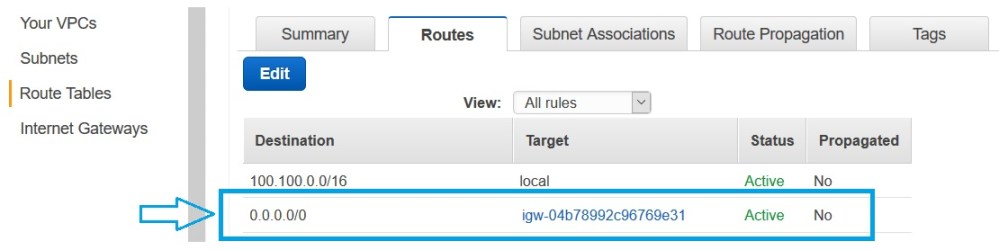
5. The associated Routing Table has a “0.0.0.0/0” rule defined that redirects the traffic to IGW (which in turn sends the traffic out)
6. The security group associated with EC2 instance, allows an Incoming traffic on SSH port 22 –
either from your static/current IP address
(OR)
from anywhere 0.0.0.0/0 (not a best practice though to accept traffic from anywhere)

7. The subnet that contains the EC2 instance, is associated with correct Network ACL
8. The Network ACL associated with the EC2 instance’s Subnet, allows an Incoming traffic –
Either on SSH port 22 from your IP address or from everywhere
(OR)
allows all traffic from everywhere (insecure configuration though; only meaningful while troubleshooting)
9. The Network ACL associated with the EC2 instance’s Subnet, allows an Outgoing traffic –
Either on SSH port 22 to your IP address or towards everywhere
(OR)
allows all traffic to everywhere (insecure configuration though; only meaningful while troubleshooting)

10. The private Key created by AWS when EC2 instance was created, is stored in the directory you are referring while doing SSH
11. The SSH command, you are running uses the right user name for the instance type you have launched (e.g. “ec2-user” for Amazon AMIs)

12. The private Key file has *ONLY* read permission for *ONLY* the current user and *NO OTHER* user has *ANY* permission on it? Most SSH clients consider the key as compromised, if it is readable by anyone other than the current user.
.


 Vipul Pathak
Leave a comment