
Access Control Lists plays an instrumental role in network security. In AWS world, Network ACLs (NACLs) are referred as “Security at the Gate”, since rules are applied at Subnet level in the Implicit Router. Rules in the Network ACLs (NACLs) are numbered.
Unlike Security Groups, Network ACLs are Stateless, which means that Inbound and Outbound rules must be defined explicitly. Outbound traffic is not allowed automatically if Inbound is allowed.

NACLs are applicable on Subnet level, not on individual EC2 instances that lives within the subnet. Contrast to this, security groups are applicable on network card of EC2 instances.
When Router checks for a rule that can permit a data packet, it analyses NACL rules from a lower numbered rule to higher numbered rule, until a permitting rule is found or the last “Deny All” rule is encountered.
Rule numbers (IDs) can be defined by Admin users, e.g. Rules can be numbered like- 100, 200, 300 ….. etc, and new rules can be inserted between existing. AWS recommends that we should leave enough spacing between rule numbers.
Network ACL ends with an explicit “Deny All” rule, that cannot be deleted.
Each Subnet must be associated with a Network ACL. If it is not explicitly associated, then AWS will associate it with Default NACL automatically.
The Default Network ACL created by AWS, allows all Inbound and Outbound traffic.
The custom Network ACL created by user, by default, denies all Inbound and Outbound traffic.
In the Network ACL (of any Subnet), both Allow and Deny rules can be created. This is contrary to security groups, where only Allow rules can be created.
If two instances in a private cloud are unable to communicate with each other, then Routing Table entries can never be a problem. Routing Table always contain (unremovable) routes to facilitate local traffic flow between the Subnets of the same cloud. However, Security Groups or Network ACLs may block the traffic, if not configured correctly.
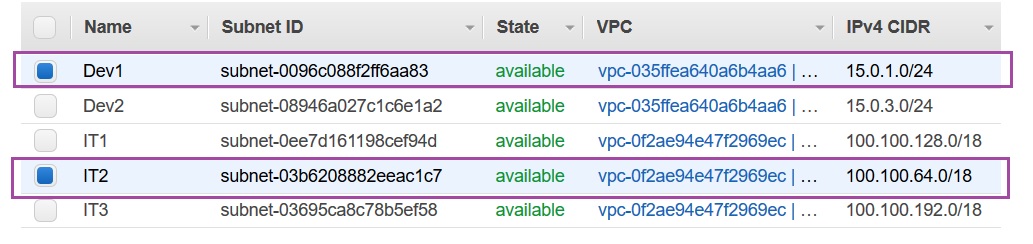
If traffic between two instances of a Subnet, never crosses the Subnet boundaries, then Network ACLs do not kick-in. No NACL is effective on internal Subnet traffic. If two instances within a Subnet have trouble communicating with each other, then probably security groups should be checked. Network ACLs come in picture when the traffic crosses Subnet boundary. In the below example, I will setup Network ACL between instances of two Subnets- 100.100.64.0/18 and 15.0.1.0/24:
Layered Security in AWS terms, means to have Network ACLs applied at the Subnet level and Security Groups applied at the NIC level. Additionally, application layer security can also be implemented in terms of software firewall on the EC2 instance.
Example:
Network ACLs between EC2 instances of two Subnets will –
- Allow SSH to the EC2 instance in 100.100.64.0/18 using Public IP address
- Do not allow EC2 instance in 100.100.64.0/18 to ping EC2 instance in 15.0.1.0/24
- But Allow EC2 instance in 100.100.64.0/18 to SSH EC2 instance in 15.0.1.0/24
- Also, Allow EC2 instance in 15.0.1.0/24 to ping EC2 instance in 100.100.64.0/18

I setup the Network ACL for subnet 100.100.64.0/18 in the following way. Ping utility basically send ICMP Echo request and expect to receive back ICMP Echo Reply. Since NACL is stateless, we need to setup Inbound as well as Outbound rules. To keep things simple, I setup Outbound rules as Allow All, and only focused on Inbound rules for each subnet –
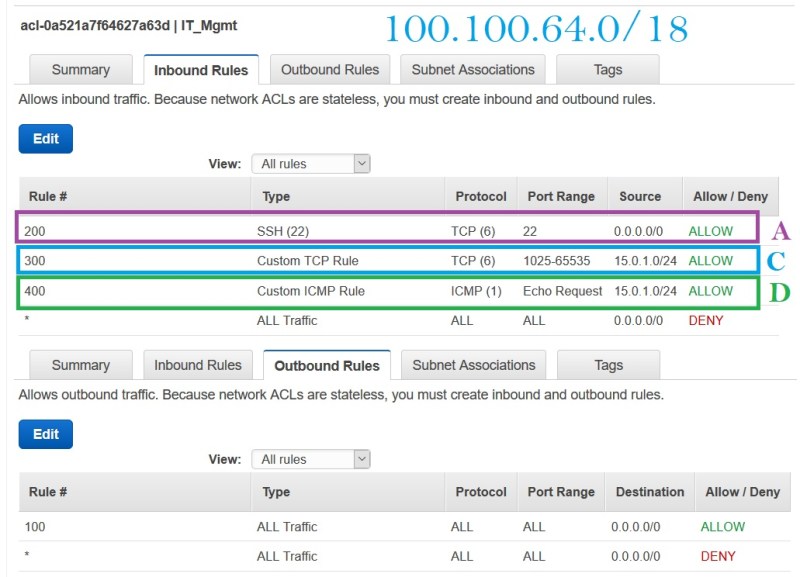
Rule “A” in the NACL above, allows me to SSH to the EC2 instance in 100.100.64.0/18 using an Elastic IP address. Section A in the command line above is made possible by Rule “A”.
Similarly, I setup the NACL for subnet 15.0.1.0/24 in the following way. We want that EC2 instance in 100.100.64.0/18 (Instance ‘x’) should be able to SSH EC2 instance in 15.0.1.0/24 (Instance ‘y’), but we don’t want Instance ‘x’ to ping Instance ‘y’.
Since there is no rule in any NACL, that allows ping from Instance ‘x’ to Instance ‘y’, hence condition ‘B’ in the above command line screenshot made possible.

Since NACL of 100.100.64.0 allows all data packets to go out, the returning packets from 15.0.1.0 are controlled by Rule ‘C’ and ‘D’ in both NACLs. Rule ‘C’ allows an incoming SSH connection on port 22 for 15.0.1.0/24 and the same rule ‘C’ allows incoming responses coming back to 100.100.64.0/18 on any ephemeral port. Similarly, rule ‘D’ allows incoming ICMP Echo Request packets from 15.0.1.0/24 and rule ‘D’ allows returning responses in the form of ICMP Echo Reply from 100.100.64.0/18.
 Vipul Pathak
Leave a comment